
Table of Contents
Did you know that over 70% of American households now prefer streaming content over traditional cable subscriptions? This massive shift is driven by the rise of internet protocol television, a modern way to watch your favorite shows using your home network.

Unlike old-fashioned satellite or cable setups, this method delivers programming directly through your high-speed connection. It offers you unmatched flexibility and control over what you watch and when you watch it.
Our guide simplifies this complex landscape for you. We will help you choose the right hardware, find legal services, and configure your apps for the best experience. You will also learn how to boost your 4K playback and troubleshoot common issues safely. Mastering this iptv technology is easier than you think.
Key Takeaways
- Understand how streaming replaces traditional cable and satellite infrastructure.
- Learn to select the best hardware for your home entertainment needs.
- Discover how to identify and use legal, reliable streaming services.
- Get practical tips for optimizing your HD and 4K video quality.
- Master simple troubleshooting steps to keep your connection stable.
What Is IPTV Technology and How Does It Work?
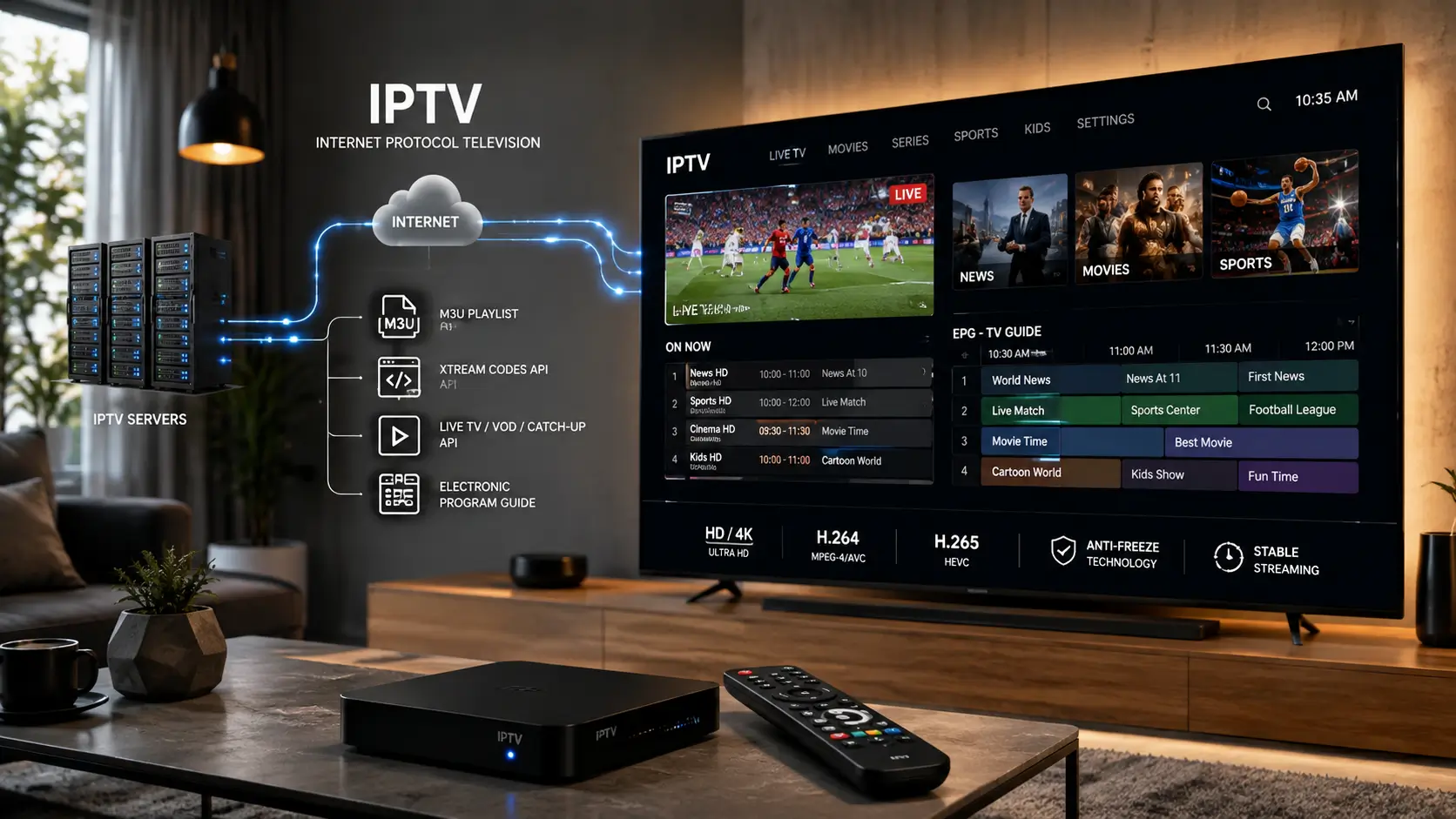
If you have ever wondered how your favorite shows travel from a server to your living room, you are in the right place. At its core, what is IPTV? It is simply a method of delivering digital television content over an internet protocol network rather than through traditional cable or satellite signals. Understanding how IPTV works allows you to take full control of your home entertainment experience.
Define Internet Protocol Television in Plain Language
Think of this technology as a way to turn your internet connection into a dedicated broadcast channel. Instead of receiving a constant stream of data like a traditional antenna, your device requests specific content packets. This shift toward digital television makes your viewing experience much more interactive and flexible than older broadcast standards.

Trace the Journey From IPTV Servers to Your Screen
The process begins at large IPTV servers, where media files are stored and managed. When you select a program, your device sends a request to these servers to start the data transmission. The content is then broken down into small packets and sent across the internet to your home network, where your player reassembles them into the video you see on your screen.
Compare Live Television, Video on Demand, and Catch-Up TV
Modern services offer three distinct ways to consume content, each providing a different level of control. Video on demand allows you to watch whatever you want, whenever you want, while live television mimics the traditional broadcast experience. Catch-up TV serves as a middle ground, letting you watch programs that aired recently.
| Viewing Mode | Flexibility | Best For |
|---|---|---|
| Live TV | Low | Sports and News |
| Video on Demand | High | Movies and Series |
| Catch-Up TV | Medium | Missed Episodes |
How Streaming Media Uses Internet Bandwidth
Because streaming media relies on a constant flow of data, your internet speed plays a vital role in quality. High-definition and 4K content require more bandwidth to ensure the video does not stutter or pause. If your network is busy with other tasks, your streaming quality may drop to maintain a smooth playback experience.
How Electronic Program Guides Organize Digital Television
An Electronic Program Guide (EPG) acts as the digital map for your content. It organizes thousands of channels and shows into a searchable, user-friendly interface. By using an EPG, you can easily browse schedules, set reminders for upcoming events, and find exactly what you want to watch without scrolling through endless lists.
Prepare Your Internet Connection and Home Network
Achieving a seamless viewing experience starts with optimizing your home internet setup. A reliable connection ensures that your media arrives without interruptions or quality drops.
Check the Download Speed You Need for HD and 4K Video
To enjoy high-quality content, you must verify that your internet plan meets specific bandwidth requirements. For standard HD streaming, a consistent speed of at least 5 Mbps is recommended for each device.
If you prefer 4K streaming, you should aim for a minimum of 25 Mbps per stream. Keep in mind that these numbers represent the bare minimum; having extra headroom is always better for a smooth experience.

Use Ethernet, Wi-Fi 6, or a Reliable Mesh Network
The way you connect your devices significantly impacts performance. An Ethernet cable provides the most stable and fastest connection, as it eliminates the interference common with wireless signals.
If you must go wireless, Wi-Fi 6 technology offers superior speed and better handling of multiple devices simultaneously. For larger homes, a mesh network system is an excellent choice to ensure consistent coverage in every room.
Reduce Buffering by Managing Network Congestion
High network congestion often occurs when multiple people in your household use the internet at the same time. Large file downloads, online gaming, and simultaneous video streams can quickly saturate your bandwidth.
You can mitigate these issues by prioritizing your streaming device in your router settings. Quality of Service (QoS) settings allow you to allocate more bandwidth to your television, ensuring it stays prioritized during peak usage hours.
Test Latency, Packet Loss, and Connection Stability
Even with high speeds, your connection might suffer from poor stability. You should regularly test your network for latency and packet loss using online diagnostic tools.
High latency or frequent packet loss will cause your video to stutter or freeze. If you notice these issues, try restarting your modem or contacting your service provider to check for line faults.
Protect Your Router With Current Firmware and a Strong Password
Security is just as important as speed for your home network. Always keep your router firmware updated to the latest version to patch potential vulnerabilities.
Additionally, use a strong, unique password for your Wi-Fi network to prevent unauthorized access. Securing your router not only protects your data but also ensures that no unwanted devices are consuming your bandwidth.
Choose the Right IPTV Setup for Your Devices
Your viewing experience starts with selecting the right device for your home entertainment setup. Whether you are a casual viewer or a power user, the hardware you pick determines how smoothly your content plays. This iptv box guide helps you navigate the options available for your home.
Set Up IPTV on a Smart TV
Most modern televisions come with built-in operating systems that support various streaming applications. Using Smart TV IPTV is often the most convenient method because it requires no extra cables or hardware. You simply download a compatible player from your TV’s app store and enter your provider details.
Choose an IPTV Box Such as the Amazon Fire TV Stick 4K Max or Apple TV 4K
If you want the best performance, a dedicated streaming device is usually the superior choice. The Amazon Fire TV Stick 4K Max offers a fast processor and excellent support for high-definition streams. Alternatively, the Apple TV 4K provides a premium interface and seamless integration for users already in the Apple ecosystem.
Use IPTV on Android Phones, iPhones, Windows PCs, and Mac Computers
Flexibility is a major benefit of modern digital television, as you can take your content anywhere. You can install dedicated players on your smartphone or tablet to watch on the go. Desktop users on Windows or Mac can also utilize robust software players to manage large playlists and EPG data efficiently.
Check App Compatibility, Remote Controls, and Accessibility Features
Before you commit to a specific device, verify that your preferred player app is available on that platform. Ease of use is critical, so look for devices that offer intuitive remote controls or voice search capabilities. Many modern platforms also include accessibility features like screen readers and high-contrast modes to improve your experience.
Decide When a Dedicated Streaming Device Is Better Than a Built-In TV App
While built-in apps are convenient, they often lack the processing power of dedicated hardware. A separate box usually receives more frequent software updates and offers better codec support for 4K video. If you notice frequent buffering or sluggish menus, upgrading to a dedicated device is a smart move.
| Device Type | Performance | Ease of Use | Upgradeability |
|---|---|---|---|
| Smart TV App | Moderate | High | Low |
| Streaming Stick | High | High | Medium |
| Premium Box | Excellent | High | High |
| PC/Mobile | Variable | Medium | High |
Evaluate IPTV Services, Subscriptions, and Content Rights
Choosing the right way to watch your favorite shows involves more than just picking a channel list. You must look closely at how different providers operate to ensure you get a stable and high-quality experience.
Compare Subscription-Based TV With Free and Paid IPTV Solutions
When you explore the market, you will encounter both subscription-based tv models and various free options. Many legitimate over-the-top (ott) services offer structured monthly plans that guarantee consistent uptime and professional maintenance.
In contrast, free iptv solutions often lack the infrastructure needed for reliable streaming. While they might seem appealing at first, they frequently suffer from frequent buffering and sudden service outages that can ruin your viewing experience.
Confirm That a Provider Has Legal Rights to Its Channels and Programs
It is vital to verify that your chosen provider holds the proper licensing for the content they distribute. Reputable companies secure legal agreements with broadcasters to ensure that your access remains uninterrupted and fully compliant with copyright laws.
Using services that lack these rights can lead to sudden shutdowns of your account. Always prioritize providers that are transparent about their partnerships and content distribution agreements.
Review Channel Lineups, Regional Availability, VOD Libraries, and Catch-Up TV
Before committing to a plan, examine the specific features offered by the service. A great provider should offer a diverse channel lineup that matches your regional interests and viewing habits.
Check if they provide a robust video on demand (vod) library for movies and series. Additionally, look for catch-up tv features, which allow you to watch programs you might have missed earlier in the week.
Identify Reliable Billing, Refund, and Customer Support Policies
Reliable billing is a hallmark of a trustworthy service. Look for providers that offer secure payment gateways and clear refund policies if the service does not meet your expectations.
Good customer support is equally important for your peace of mind. Ensure the company provides responsive help through email, live chat, or a dedicated support portal to resolve any technical issues quickly.
Recognize Warning Signs of Illegal or Untrustworthy Services
Be cautious of services that promise an unrealistic number of channels for a suspiciously low price. These are often major red flags indicating that the provider does not have the legal rights to the content.
Other warning signs include unclear ownership information, a lack of professional terms of service, or requests for payment through untraceable methods. If a provider seems too good to be true, it is usually best to look for a more established alternative.
Configure M3U Playlists, EPG Data, and IPTV Apps
You can easily transform your device into a powerful entertainment hub by configuring the right software. Getting your system ready involves a few logical steps that bridge the gap between your internet connection and your favorite shows.
Step 1: Install a Reputable IPTV Player
The first step is selecting a reliable IPTV player that supports your specific device. Popular options like TiviMate, IPTV Smarters, or Perfect Player offer intuitive interfaces for managing your streams. Ensure you download these applications only from official app stores to maintain device security.
Step 2: Add an Authorized M3U Playlist or Provider Login
Once your app is installed, you must connect it to your service. Most providers offer an m3u playlist link or specific login credentials. Simply navigate to the “Add Playlist” section in your app and input the URL or your account details to sync your channel list.
Step 3: Import EPG Data and Match Program Guide Channels
An epg is essential for seeing what is currently playing and what is coming up next. You will typically need to paste the provided guide URL into the settings menu of your player. This allows the software to map the schedule data to the correct channels automatically.
Step 4: Organize Favorites, Categories, Parental Controls, and VOD
After your channels load, take time to customize your viewing experience. You can mark your most-watched channels as favorites for quick access. Additionally, ensure you enable parental controls if you have children, and explore your vod library to find movies and series available on demand.
| Feature | Basic Player | Advanced Player |
|---|---|---|
| Multi-Playlist Support | Limited | Unlimited |
| EPG Integration | Manual | Automatic |
| VOD Sorting | Basic | Advanced Filters |
| Parental Controls | No | Yes |
Use Xtream Codes Credentials Only Through an Authorized Provider
When using xtream codes, always ensure you are dealing with a legitimate service. These credentials provide direct access to your subscription, so verify that your provider is authorized to distribute the content you are accessing.
Keep Playlist URLs and Account Details Private
Your m3u playlist URL and login information are unique to your account. Never share these details on public forums or social media platforms. Keeping your account information private prevents unauthorized users from accessing your service and ensures your connection remains stable.
Optimize Picture, Sound, and Streaming Performance
Fine-tuning your streaming performance ensures that every frame looks crisp and every sound remains clear. By adjusting your device settings, you can create a theater-like experience right in your living room. Small tweaks to your configuration often lead to significant improvements in overall stability.
Choose Between Automatic, HD, and 4K Video Quality
Most modern players offer an “Automatic” setting that adjusts quality based on your current internet speed. While convenient, you might prefer locking the resolution to 1080p HD or 4K if you have a stable, high-speed connection. Consistent quality prevents the annoying shifts in clarity that occur when your network fluctuates.
Understand H.264 vs H.265 Video Compression
When following an iptv encoder guide, you will notice that video compression plays a vital role in how data travels to your screen. The debate of h.264 vs h.265 centers on efficiency and hardware support. H.265, or HEVC, provides superior quality at lower bitrates, but it requires more processing power from your device.
| Feature | H.264 (AVC) | H.265 (HEVC) |
|---|---|---|
| Efficiency | Standard | High |
| Bandwidth Usage | Higher | Lower |
| Compatibility | Universal | Modern Devices |
Match Audio Output to Your TV, Soundbar, or AV Receiver
Audio settings are just as important as visual clarity for an immersive experience. Ensure your player is set to “Passthrough” if you are using a high-end AV receiver or soundbar. This allows your external hardware to handle the decoding, resulting in richer, more accurate sound.
Adjust Buffer Size, Frame Rate, and Resolution Without Overloading Your Network
If you experience stuttering, try lowering your buffer size slightly to reduce initial load times. Matching your frame rate to the source content prevents the “soap opera effect” or motion blur. Always prioritize a resolution that your network can sustain without constant buffering.
Use Anti-Freeze Technology Carefully and Diagnose Its Limits
Many providers offer anti-freeze technology to help smooth out minor connection hiccups. Treat this as a temporary fix rather than a permanent solution for a weak network. If you find yourself relying on it constantly, it is time to upgrade your internet plan or switch to a wired Ethernet connection for true reliability.
Compare IPTV With Cable TV, Satellite TV, and Streaming Services
You might wonder how modern internet-based television stacks up against the legacy systems you have used for years. Making the right choice depends on your specific needs for content, reliability, and budget.
IPTV vs Cable TV: Channel Bundles, Equipment, and Contract Costs
When you evaluate iptv vs cable tv, the primary difference lies in the delivery method. Cable providers typically require proprietary set-top boxes and long-term service contracts that lock you into specific channel bundles.
In contrast, IPTV often offers more flexibility by allowing you to use your own hardware, such as smart TVs or streaming sticks. You can frequently avoid the high monthly rental fees associated with traditional cable equipment.
IPTV vs Satellite TV: Weather, Installation, and Location Considerations
Comparing iptv vs satellite tv reveals significant differences in reliability. Satellite signals are prone to “rain fade,” where heavy storms or snow can disrupt your picture quality.
IPTV relies on your broadband connection, which remains stable regardless of the weather outside. Furthermore, satellite dishes require a clear line of sight to the southern sky, making them difficult to install in apartments or heavily wooded areas.
IPTV vs Streaming Services: Live Channels, On-Demand Libraries, and Flexibility
The line between iptv vs streaming services is often blurred, but the core difference is the focus on live broadcast content. While streaming platforms prioritize on-demand libraries, IPTV is designed to replicate the traditional live TV experience with channel guides and real-time viewing.
You gain the most value by choosing a service that balances live sports and news with a robust library of on-demand movies. This hybrid approach provides the best of both worlds for your entertainment needs.
Understand Where IPTV Uses the Same Internet Delivery Model as Over-the-Top (OTT) Services
It is important to recognize that IPTV often utilizes the same infrastructure as over-the-top (ott) services. Both models deliver video content over the public internet rather than through dedicated, closed-circuit lines.
This shared delivery model means that your streaming quality is heavily dependent on your home network speed. If your internet connection is fast and stable, both IPTV and OTT platforms will provide a seamless viewing experience.
Choose the Best Option for Sports, News, Family Viewing, and Local Channels
Selecting the right service requires prioritizing what you watch most. If you are a fan of live sports and local news, ensure your provider includes regional broadcast networks in their lineup.
| Feature | IPTV | Cable/Satellite |
|---|---|---|
| Installation | App-based | Professional |
| Weather Impact | None | High |
| Flexibility | High | Low |
For family viewing, look for services that offer robust parental controls and multiple user profiles. By weighing these factors, you can build a setup that perfectly matches your household habits.
Use Interactive IPTV Features Beyond Traditional Television
Modern television has evolved far beyond the simple act of watching a scheduled broadcast. You now have the power to curate your own entertainment schedule, turning your living room into a truly dynamic media hub.
Pause, Rewind, Record, and Resume Live Programming
One of the greatest benefits of this technology is the ability to control time. You no longer need to rush home to catch the start of a game or a season finale.
- Pause live broadcasts whenever you need a quick break.
- Rewind to catch a missed line of dialogue or a spectacular sports play.
- Record entire series to your cloud storage for later viewing.
- Resume playback exactly where you left off on any compatible device.
Personalize Recommendations and Search Across Live TV and VOD
Finding something great to watch is easier when your system learns your preferences. Modern platforms integrate live channels with vod libraries to provide a seamless discovery experience.
You can search across your entire catalog to find specific genres or actors. This unified approach ensures that your favorite vod content is always just a few clicks away from your live feed.
Combine IPTV With Multiplayer Online Gaming and Other Interactive Services
Integrating interactive services into your home network requires careful planning, especially if you enjoy gaming. High-speed internet is the backbone of both your streaming and your multiplayer online gaming sessions.
When multiple users are active, bandwidth can become a bottleneck. Consider the following table to manage your network resources effectively:
| Activity | Bandwidth Priority | Impact |
|---|---|---|
| 4K Streaming | High | Requires stable connection |
| Online Gaming | Critical | Sensitive to latency |
| Web Browsing | Low | Minimal impact |
Use Multi-Screen Viewing and Device Handoff Responsibly
The convenience of multi-screen viewing allows you to watch content on a tablet while your family uses the main TV. Always ensure your home network can handle multiple concurrent streams to avoid buffering.
Device handoff features let you move your stream from a phone to a television instantly. Use this feature to keep your entertainment flowing as you move between rooms.
Set Parental Controls and Separate Adult Profiles From Children’s Profiles
Keeping your digital environment safe is a top priority for every household. You should create distinct profiles to ensure that children only access age-appropriate content.
Most platforms allow you to set PIN codes for adult profiles. This simple step provides peace of mind while everyone enjoys their favorite shows.
Troubleshoot Common IPTV Problems Safely
Encountering glitches while watching your favorite shows is frustrating, but most issues are easy to fix with the right approach. Effective IPTV troubleshooting relies on a calm, step-by-step method to identify the root cause of your disruption.
Fix Buffering, Freezing, and Sudden Video Quality Changes
If you notice constant buffering or the screen freezing, your internet connection is often the primary culprit. High-definition streams require consistent bandwidth, so ensure no other devices are hogging your network capacity.
Sudden drops in video quality usually indicate that your connection speed has dipped below the threshold required for your current stream. Try switching to a lower resolution setting within your player to see if the playback stabilizes.
Resolve Login Errors, Expired Playlists, and Missing Channels
Login errors often stem from incorrect credentials or temporary outages on the provider’s side. Double-check your username and password, and ensure your subscription status is active.
If your channels disappear or your playlist fails to load, it may have expired. You should contact your service provider to verify if they have updated their iptv servers or if your specific link needs a refresh.
Repair EPG Gaps, Audio Delays, Subtitle Issues, and App Crashes
An incomplete epg can make it difficult to find your favorite programs. You can often fix this by manually refreshing the guide data within your application settings.
Audio delays or subtitle sync issues are frequently caused by software bugs. If the app crashes repeatedly, it is time to perform a clean installation to clear out corrupted files.
Restart Devices, Update Apps, and Clear Cache in the Correct Order
When problems persist, follow this standard recovery sequence:
- Restart your streaming device to clear temporary memory.
- Update your IPTV application to the latest version.
- Clear the cache in your app settings to remove outdated data.
Determine Whether the Problem Comes From Your Network, Device, App, or IPTV Server
To isolate the issue, test your connection on a different device or network. If the problem follows you, the issue likely lies with the iptv servers or your account configuration rather than your local hardware.
Protect Yourself From Malware, Phishing, Unsecured Apps, and Suspicious VPN Claims
Prioritize your malware protection by only downloading apps from official, trusted sources. Avoid clicking on suspicious links that promise “free” premium content, as these are common vectors for phishing attacks.
Be wary of services that push aggressive or suspicious VPN claims. Always use reputable security software to keep your personal data safe while you enjoy your content.
Conclusion
Modern iptv technology transforms how you consume media by blending internet connectivity with your favorite entertainment devices. You now hold the power to curate a personalized library that fits your lifestyle perfectly.
Success starts with a stable home network and compatible hardware like an Apple TV 4K or Amazon Fire TV Stick. Always prioritize IPTV safety by choosing authorized services that respect content rights. Protecting your private account details ensures a secure environment for your household.
Take time to configure your settings for the best picture and sound quality. A thoughtful approach to your setup makes streaming more reliable for your daily viewing habits. Enjoy the flexibility and control that comes with this advanced way to watch television.
FAQ
What is IPTV technology and how does it deliver content to my home?
Internet protocol television (IPTV) is a modern way of receiving your favorite shows by delivering television programming through internet-connected devices rather than traditional broadcast, cable, or satellite signals. Unlike legacy systems, IPTV solutions move data from IPTV servers through your home network, allowing you to access digital television with much higher flexibility on your own schedule.
How does streaming media differ between Live TV, VOD, and Catch-up TV?
When you explore how IPTV works, you will find three main content types. Live television allows you to watch broadcasts in real-time, such as sports or news. Video on demand (VOD) lets you browse a library of movies and shows to watch whenever you want. Finally, catch-up TV records past broadcasts so you can watch them hours or days later if you missed the original air time.
What internet speeds and hardware do I need for reliable HD and 4K playback?
To enjoy high-quality streaming media, you generally need a download speed of at least 25 Mbps for 4K. For the best stability, use an Ethernet connection or a Wi-Fi 6 mesh network to reduce latency and packet loss. Keeping your router firmware updated and managing network congestion from multiplayer online gaming will help prevent frustrating buffering during your favorite shows.
Should I use a built-in Smart TV app or a dedicated IPTV box?
While many Smart TVs have built-in apps, a dedicated IPTV box like the Amazon Fire TV Stick 4K Max or Apple TV 4K often provides a smoother experience. These devices typically offer better processing power, more frequent app updates, and superior remote controls, making them the preferred choice for a high-performance iptv box guide setup.
How can I tell if a subscription-based TV service is legal and trustworthy?
Always verify that your provider has the legal rights to distribute its channels. Reputable subscription-based tv services will have clear billing policies, accessible customer support, and realistic channel claims. Be wary of services that lack official websites, use suspicious payment methods, or offer “too good to be true” prices for thousands of premium international channels without over-the-top (OTT) services licensing.
What is the best way to configure an M3U playlist or Xtream Codes?
First, install a reputable IPTV player on your device. You can then add your authorized m3u playlist URL or enter your xtream codes credentials provided by your service. Once connected, your player will import EPG (Electronic Program Guide) data, allowing you to organize your favorites, set parental controls, and browse VOD categories with ease.
What is the difference between H.264 vs H.265 in an IPTV encoder guide?
These are video compression standards that affect your viewing quality. H.264 is widely compatible with older devices, while H.265 (HEVC) offers much better compression, allowing you to stream 4K video using less bandwidth. Choosing the right codec in your iptv encoder guide settings ensures you get the best picture without overloading your home network.
How does IPTV vs cable TV and IPTV vs satellite TV compare in terms of value?
In the iptv vs cable tv debate, IPTV often wins on price and flexibility, as it doesn’t require long-term contracts or bulky proprietary equipment. When comparing iptv vs satellite tv, IPTV is more reliable in bad weather since it doesn’t rely on a clear line of sight to the sky. Compared to standard iptv vs streaming services (like Netflix), IPTV focuses more on providing a comprehensive live channel lineup alongside on-demand content.
Can I use interactive services like pausing live TV or multi-screen viewing?
Yes! One of the biggest perks of iptv technology is the suite of interactive services available. You can pause, rewind, and record live programming. Many advanced setups also support multi-screen viewing, allowing you to watch different matches or shows simultaneously, and separate user profiles to keep your personalized recommendations away from the kids’ cartoons.
What is anti-freeze technology, and can it fix my buffering issues?
Anti-freeze technology is a server-side feature used by some providers to minimize skips and loops during high-traffic events. While it can help stabilize a stream, it is not a “magic fix” for a slow internet connection. If you experience freezing, you should still check your local network stability and ensure your buffer size settings are optimized for your current speeds.
How do I troubleshoot common problems like login errors or a missing EPG?
If you encounter issues, start by restarting your device and your router. Clear the cache in your IPTV app and ensure your m3u playlist link is still active. If the EPG is blank, try manual synchronization in the app settings. Always protect yourself by using verified apps and avoiding suspicious VPN claims that promise “unlocked” content while potentially exposing you to malware or phishing.









